Context Switching at Work: A Task List to Reset Faster
context switching at work: log each interruption, spot what pulls you away, and leave a clear restart note so you can return to the task with less friction.
By All-in-One Task Tracker by Cosmo Suite · Editorial policy
Published · 9 min read
Context switching at work happens when you pause a task and direct your attention to another. It might be planned, like finishing a call and then opening a spreadsheet. It might also be an incoming message that pulls you away mid-sentence.
Keep a short task log for one workday to see which switches send you back to unfinished work. Record what you left, what you opened next, why you changed tasks and one sentence that tells you where to resume. A minute-by-minute record is unnecessary.
Context Switching at a Glance
Context switching is a move from one task context to another. An interruption is a switch caused by an outside event, such as an unexpected message. Some moves are planned, and some are necessary. Record whether you chose to switch, responded to something, or could not see the next step in the original task.
| What happened | Example | What to record |
|---|---|---|
| Focused work | Drafting a report for 40 minutes | No switch until the task changes |
| Planned transition | Finish the report, then attend a class | Mark it planned |
| Interruption | Stop writing to answer an incoming message | Mark the source and restart point |
| Simultaneous work | Write while also following a conversation | Note that attention was split |
The American Psychological Association's overview of switching costs describes switching between tasks as one form of multitasking and notes that psychologists measure the time required to shift between tasks. That research describes a cost of switching; it does not mean every switch at work has the same effect. A scheduled call and an unexpected message are different events, even if both change what you are doing.
The log below separates those events. For a related guide to keeping personal, study and work items in one spreadsheet, see how to use an Excel task tracker for recurring and one-off tasks.
The All-in-One Task Tracker (by Cosmo Suite: one Excel and Google Sheets file, 11 tabs, $9 once) keeps work and personal tasks in one file. See how its calendars and task views use the same list.
The Tuesday Desk Day, Worked Through
This constructed Tuesday shows how a short log separates planned events from interruptions. It is not a record of observed workers or minutes lost. The entries make an ordinary busy morning easier to read afterward.
Imagine you need to finish a report, answer routine email, review class notes and confirm a home delivery. You also have a short meeting. The tasks are ordinary; the tricky part is seeing which transitions were planned and which interrupted something already underway.
| Time | Task you left | Next task | Reason | Planned? | Restart note |
|---|---|---|---|---|---|
| 9:00 | None | Draft monthly report | Start of day | Yes | Add the two missing headings |
| 9:35 | Draft monthly report | Reply to email | New message | No | Return to the sales table, row 18 |
| 9:48 | Reply to email | Draft monthly report | Email batch done | Yes | Compare April and May totals |
| 10:20 | Draft monthly report | Team check-in | Calendar event | Yes | Finish the paragraph on returns |
| 10:45 | Team check-in | Draft monthly report | Meeting ended | Yes | Check the returns paragraph |
| 11:10 | Draft monthly report | Confirm home delivery | Phone alert | No | Finish source notes, then proof table |
| 11:18 | Confirm home delivery | Review class notes | Delivery confirmed | Yes | Start at the notes on chapter 4 |
| 11:45 | Review class notes | Draft monthly report | Study block ended | Yes | Proof the table and save a copy |
The table records seven transitions after work begins. Two were interruptions, from email and a phone alert. Five were planned or scheduled. Use that count to ask where the next work block might be easier to protect.
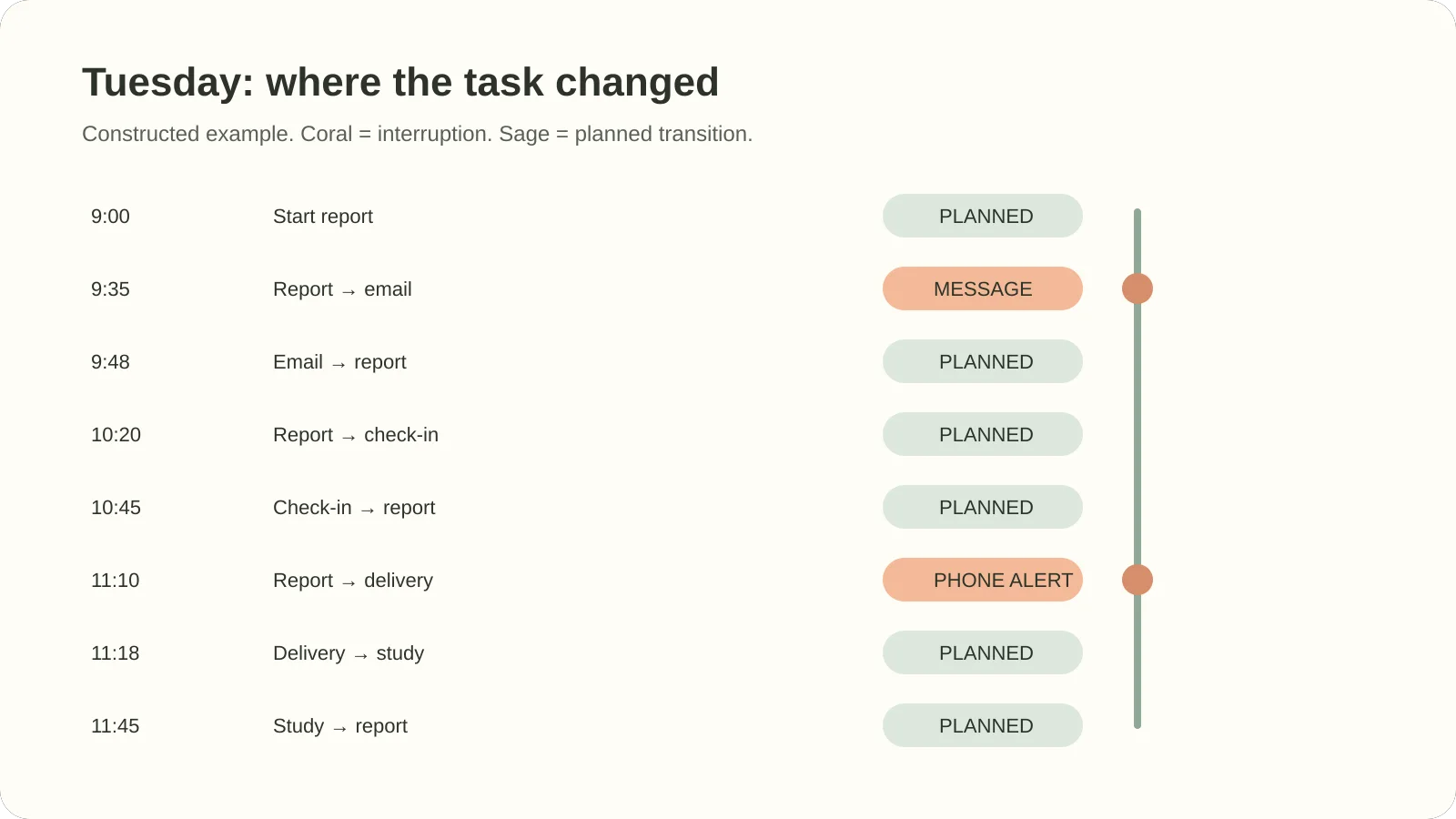
The restart notes point to a place and an action. “Continue report” leaves you searching. “Return to the sales table, row 18” gives you a start, whether you return in two minutes or after lunch.
Step 1: Record the Switch, Not Every Minute
Use a few details that can reveal a repeated pattern. Start a table with Time, Task left, Next task, Context, Reason, Planned? and Restart note. A restart note is one short instruction that tells you where to continue. Add a row when you leave a task you expected to keep doing.
Opening a source document to check a figure still counts as report work. Record a switch when you leave that task to answer a message or move to a different task. This keeps the log short enough to use.
Use a few names in Context, such as Work, Study and Home. Keep Reason to short labels you can reuse: Message, Meeting, Waiting, Unclear next step or Planned break. You can filter these labels later without writing a full account of each event.

This real tracker screenshot shows the workbook's built-in sample rows, not the Tuesday example above.
If the switch is interruptive, leave a restart note before moving on when you can. Name the next small action and the place you need to return to. “Open the May tab and compare row 18 with the source” is more useful than “finish report.”
Step 2: Find the Repeated Triggers
Review the log at the end of the day. Count the No entries in Planned?, then filter by Reason or Context. This count will not tell you how many minutes you lost. It can show where a small change may reduce avoidable returns.
If Planned? is in column F, place this formula in an empty cell:
=COUNTIF(F2:F20,"No")
Microsoft's COUNTIF function reference explains the range and criteria arguments. Here the range is the Planned? column and the criterion is No.
Change F2:F20 to cover your actual log. In the constructed Tuesday example, the formula returns 2 because two rows are marked No. That count belongs to the example only. In your own sheet, look for a repeated trigger across several days before changing your routine.
You can also filter Reason to Message and check which tasks were interrupted. If the same task is repeatedly left unfinished, add a restart note before the next work block or put routine message checks at a time that fits your role. If the entries are mostly planned meetings, the useful action may be to place a smaller task between them rather than trying to eliminate the meetings. Google explains how to filter tasks in Sheets; these let you focus on matching rows while keeping the full list.
The task list template guide explains how due dates, status and recurring items can live in one table. A filtered list helps when the full task queue has become hard to scan.
Step 3: Make Returning Easier
Some interruptions are outside your control. Make the return clearer with a next-action note, one visible current task, and a decision about which low-urgency items can wait for a batch.
Try these adjustments for the next few workdays:
- Leave a restart note. Write the next action before you close or switch away from a task.
- Batch routine checks. If your role allows it, handle routine messages together instead of opening each one as it arrives.
- Keep necessary switches visible. A call, pickup, class or care task may need attention at a fixed time. Add it to the same list so it is planned, not a surprise.
- Name the reason. “Waiting for reply” and “new request” point to different next steps.
- Reduce the active list. Keep the next few tasks in view and filter completed rows out of your working view.

The screenshot shows the tracker’s sample data and built-in filters. Your log can use its own context and reason columns.
If the same message check interrupts two work tasks each morning, try checking messages after a natural stopping point. Keep the log for a few days. One quieter day does not show whether the change will last.
What Actually Reduces the Cost
Start with a clear handoff back to the task. Group similar work when the schedule allows it. A restart note helps when meetings, messages or home responsibilities still break up the day.
The APA's overview of multitasking research explains that switching tasks involves control processes and can take time. In two experiments, Sophie Leroy's study of attention residue examined how attention can remain on an unfinished task after a person moves to another. The study is not a measurement of every workplace interruption, so avoid turning its findings into a universal “minutes lost per switch” rule.
[Unique insight] The log separates planned events from unexpected ones, which points to different next steps. Keep necessary transitions in the schedule. Make the task you leave easier to resume. If the same task keeps getting interrupted at one point, split its next step to fit the time you have.
The tracker can help keep those steps together: one Excel and Google Sheets task tracker with calendars and task views gives you a single task list to filter. Use your own columns for reason and restart note; those are not built-in context-switching fields.
Where the All-in-One Task Tracker Fits
The tracker is a spreadsheet for one-off and recurring tasks, calendars and priority views. It can keep the tasks you are switching between in one file, so you have a visible place to choose what comes next.
Its Task Filter has 15+ options, and the workbook also includes a Dashboard, Weekly and Monthly Calendars, a Decision Matrix, Kanban Board and Gantt Chart. It does not measure interruptions or calculate context-switch costs. You can add your own Context, Reason and Restart note columns to a task list if those fields help you review the day.
If you want to see the tabs and formats before deciding, use the Excel and Google Sheets task tracker preview.
The Cosmo Suite team publishes this guide. Read about this site and the editorial policy for how we handle sources and corrections. To suggest a correction, contact support@ultimatetasktracker.site.
Frequently Asked Questions
What is context switching in humans?
Context switching in humans means moving attention from one task to another. At work, that could mean stopping a report to answer a message, then returning to the report. The switch can be planned or unexpected. A short log helps you see which kind of transition repeats.
Is context switching the same as multitasking?
No. Context switching usually means doing tasks one after another, while multitasking means trying to handle more than one activity at once. People use the terms loosely, but the difference helps you identify whether you changed tasks or split your attention.
How do you switch contexts effectively?
Write a short restart note before you leave the current task. Name the next action and the file, page or person you need. When the switch is optional, put it into a later batch. When it is necessary, the note gives you a specific place to resume.
Is every task switch harmful?
No. A scheduled call, class or family responsibility may be a normal part of the day. A task log is useful for noticing unnecessary switches and making required ones easier to manage. It is not a reason to treat every interruption as a failure.
How do you track task switching?
Record the task you left, the next task, the reason, whether the move was planned and a restart note. Count the interruptive rows at the end of the day. This shows the number of logged interruptions, not the minutes they cost.
What is a quick way to resume a task?
Write one action that you can do next, along with the place to do it. “Open the May tab and check row 18” gives you a start. “Continue report” leaves you to reconstruct where you stopped.
Frequently asked questions
What is context switching in humans?
Context switching in humans means moving your attention from one task to another. At work, it can mean pausing a report to answer a message, then returning to the report. Your attention has to reorient each time, so record the transition when you want to see what is interrupting a task.
Is context switching the same as multitasking?
No. Context switching usually means doing tasks one after another, such as stopping one task to work on another. Multitasking means trying to handle more than one activity at once. People often use the words loosely, but separating them helps you spot whether you changed tasks or split your attention.
How do you context switch effectively?
Write down the next action before leaving a task, then note why you switched and when you plan to return. If the switch is optional, add it to a later batch. If it is necessary, the note gives you a place to restart without reconstructing the whole task.
Is every task switch harmful?
No. Some jobs require quick responses, and planned transitions can be useful. The aim is to notice avoidable switches and make necessary ones easier to resume. A short log can show whether a particular interruption repeats or whether a switch was simply part of the day's work.
How do you track task switching?
Use one row each time you move away from an active task. Record the previous task, the next task, the reason, whether the switch was planned, and a restart note. At the end of the day, count switches by reason instead of estimating lost time.
What is a quick way to resume a task?
Leave a sentence that names the next physical action and the file, page, or person you need. For example: 'Open the budget tab and check the April total against the bank statement.' A concrete restart note is easier to follow than 'continue report.'
