Assignment Trackers That Keep You Ahead (Matched to Your Course Load)
Assignment tracker setup for a full semester: 4 courses and 22 assignments worked through, the hours each one needs, and which tracker fits your course load.
By All-in-One Task Tracker by Cosmo Suite · Editorial policy
Published · 8 min read
Students fall behind on assignments for three predictable reasons. Due dates are scattered across four different course pages, and big assignments look small until the week they're due. Then exam week arrives with three essays still open. All three come down to where the dates live. A task tracker that holds every course's deadlines in one file keeps them in one place.
The short answer: in week one, transfer every assignment from every syllabus into one list, recording the course, due date and grade weight. Then calculate a start date from the weight. That converts the semester into a calendar you can anticipate.
Below is a complete semester worked through, plus the tracker that suits your course load.
Assignment Trackers at a Glance
An assignment tracker is one list of every graded item in your courses. Each row holds a due date, weight and status, organized in one place for the entire term. The right format depends mostly on how many courses and deadlines you're managing simultaneously.
| Course load | Deadlines per term | What works | Best for |
|---|---|---|---|
| 1-2 courses | Under 10 | A paper planner or the course portal's calendar | Part-time study, one module at a time |
| 3-4 courses | 15-30 | One spreadsheet list with course, weight and status | Most full-time students |
| 5+ courses or a job alongside | 30+ | A linked tracker: list, calendar and timeline in one file | Heavy terms, work plus study |
The middle row describes most full-time students, and it's where a plain list begins to struggle by midterm.
The Semester, Worked Through
Here is one realistic term: 4 courses and 22 graded assignments over 14 weeks. The weights are typical of syllabus breakdowns rather than copied from any particular university.
| Course | Assignments | Coursework weight | Hours at 2 per 5% |
|---|---|---|---|
| Biology | 4 lab reports, 1 project, 1 poster | 50% | 20 |
| English | 3 essays, 2 reading responses | 55% | 22 |
| Statistics | 6 problem sets, 1 data project | 40% | 16 |
| History | 2 papers, 1 presentation, 1 annotated bibliography | 45% | 18 |
| Total | 22 | 76 |
Grade weight is the share of the final grade an assignment carries, and it drives the hours column. The rule comes from Sheridan College's assignment tracker guide: plan about two hours of work for every 5% an assignment is worth. A 20% essay is 8 hours. A 5% lab report is 2.
Seventy-six hours over 14 weeks is about 5.4 hours a week, which sounds manageable until you position the dates on a calendar. In this term, week 11 holds a 20% English essay and a 15% History paper. The Statistics data project, a lab report and a problem set land there too. That is five deadlines and approximately 22 hours of work in a single week, and week 14 is examinations.
Sorted by due date, week 11 looks like five ordinary rows. On a monthly calendar it appears as a wall, visible early enough to begin the essay in week 8.
You can also check the load against course credits. A credit hour is the federal unit behind most US course loads. 34 CFR 600.2 defines it as one hour of instruction plus at least two hours of out-of-class work each week. That continues for approximately fifteen weeks. Suppose each of the 4 courses carries 3 credits. That's 24 hours of outside work a week, or 336 hours over our 14 weeks. The 76 assignment hours are only about 23% of that. The remainder goes to reading and revision, so your tracker should reserve that time as well.
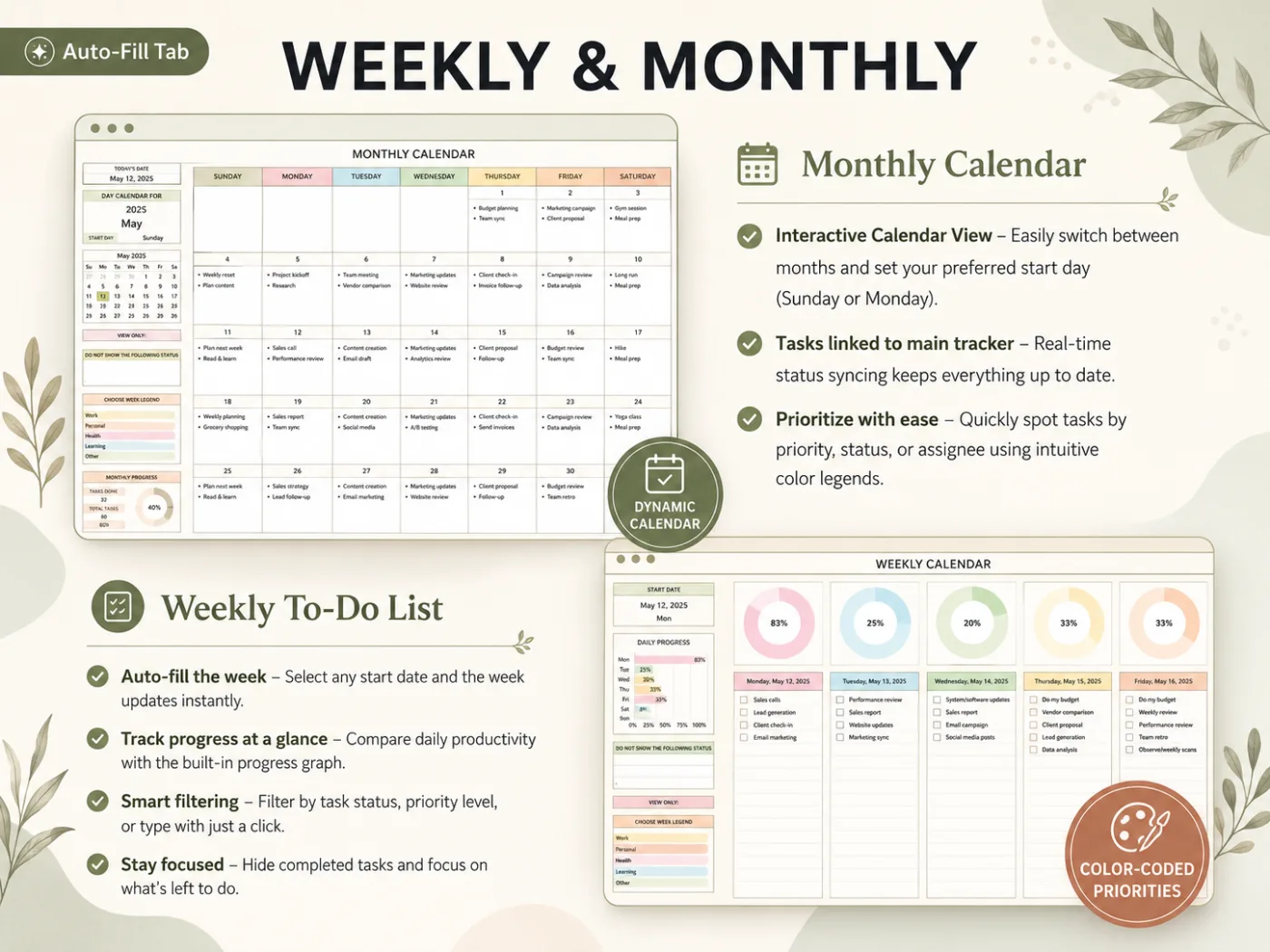
The screenshot shows the tracker's built-in sample data, not the semester above.
Step 1: Copy Every Syllabus Into One List
Begin immediately. Enter every graded item from each syllabus as a row: assignment, course, due date, weight. Enter all 22, including the 2% quizzes; it takes about 30 minutes for 4 courses.
Four separate course pages can't reveal that three deadlines land on the same Friday. One list can.
Dates change during a term: an instructor postpones an essay by a week, or a lab moves because of a holiday. When that happens, update the date in the one list and nowhere else; the calendar and the days-left column follow automatically. If you keep a paper planner as well, treat it as a copy of the sheet, not a second source.
Add a column for the assignment category too, such as lab, essay, problem set, project or presentation. After a few weeks you can filter by category and identify which kind keeps slipping. In the example term, the lab reports are small at 5% each. But there are four of them, and they're easy to leave until the night before.
Large items need splitting as well. The UNC Learning Center's priorities worksheet advises breaking larger projects, such as papers, into smaller tasks and listing each one separately.
Step 2: Add a Start Date From the Weight
Calculate the hours for each row by dividing the weight by 5, then multiplying by 2. Then choose a start date that leaves room for those hours across several study sessions.
- 5% lab report: 2 hours, start 3 days before.
- 15% History paper: 6 hours, start 10 days before.
- 20% English essay: 8 hours, start 2 weeks before.
The start date is the column that keeps you ahead. A due date only tells you when you're late, while a start date warns you a week or two before.
Step 3: Flag What's Close
Add a days-left column (=DueDate-TODAY()). Then add a conditional formatting rule that turns rows amber at 7 days and red when overdue. Sort by days left each Sunday evening, and the coming week's work becomes the top five rows. Sort by start date instead to see what needs opening this week. For the 20% essay, that's two weeks before anything turns red.
In Google Sheets, filter views let you save a "This week" or "Biology only" view without changing what anyone else sees.
Step 4: Enter Weekly Work Once
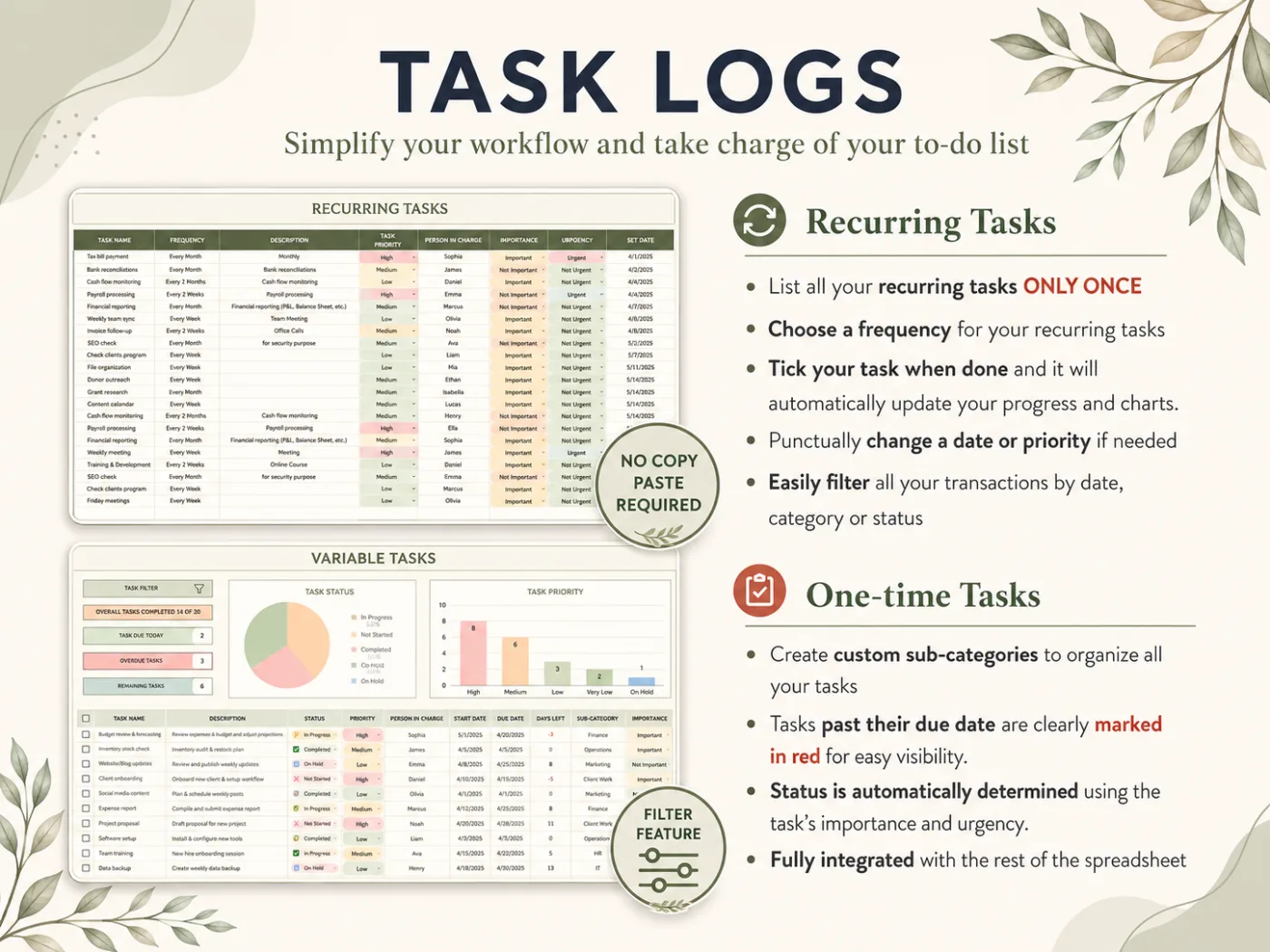
Some work repeats: the 6 problem sets and 2 reading responses share a course and weekday, every week or two. Enter them as repeating items with a frequency, instead of 8 separate rows. That keeps the list short and stops one from slipping through.
What Keeps a Student Tracker Alive Past Midterms
Five habits make the difference: order by weight, block exam week early, give big projects a timeline, add a submitted status and review every Sunday. Trackers still in regular use at week six usually have all five; the ones abandoned after week one rarely have any.
Weight beats due date for ordering. Consider a 2% quiz due tomorrow and a 20% essay due in 9 days. The essay deserves attention first, even though the quiz is closer.
Exam week goes on the calendar in week one. Mark it as a block across all five days. Include any day with only one exam, because revision fills the gaps between them. Every assignment due in the 2 weeks before it moves its start date earlier.
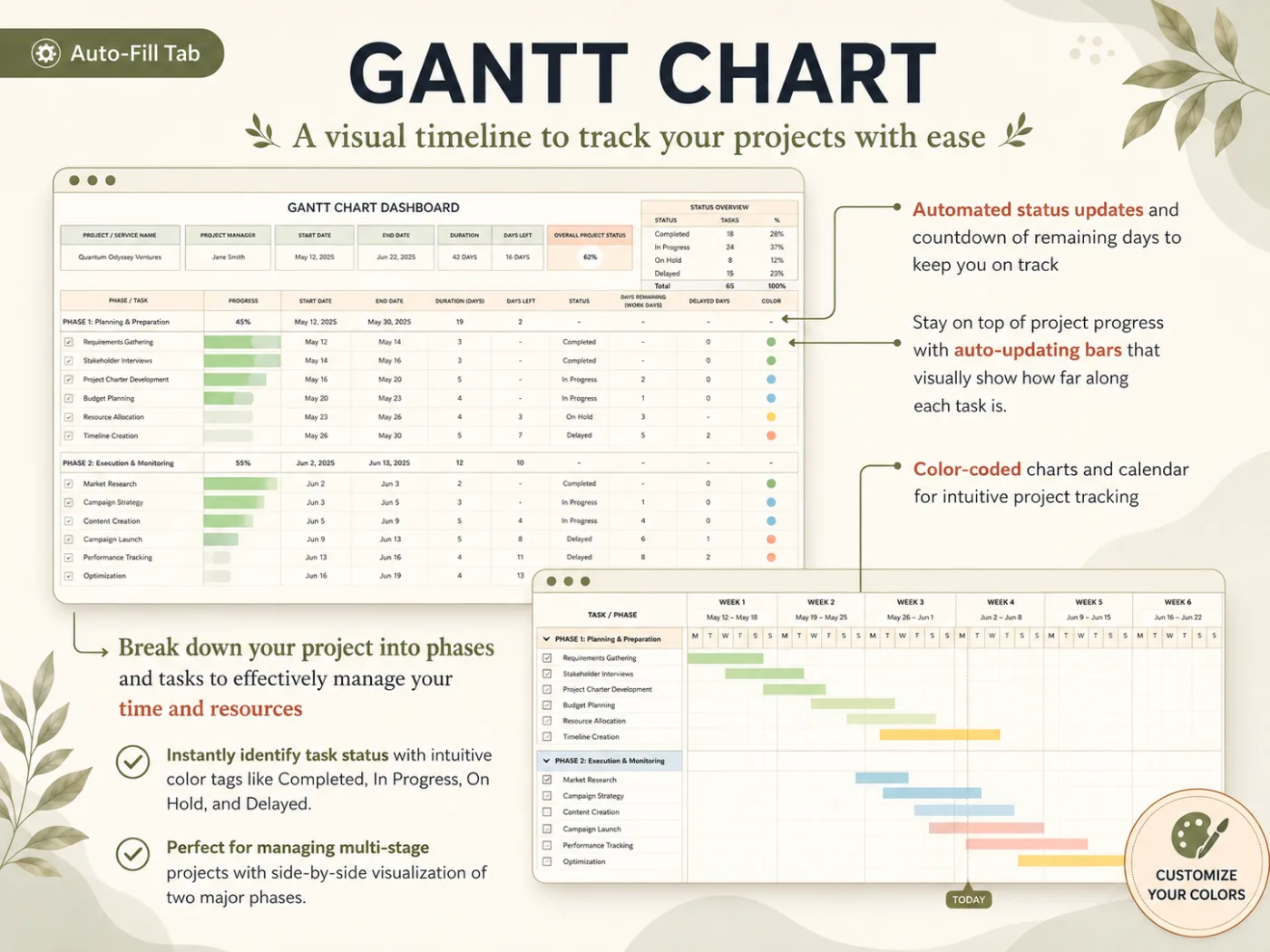
Big projects need a timeline, not a row. The Biology and Statistics projects each have stages: topic, data, draft and final. A Gantt chart shows whether the stages overlap with other deadlines. If you'd rather not build one, a spreadsheet tracker with a Gantt tab already linked to your task list covers it.
Status needs a "submitted" step. A finished essay still requires uploading. A separate submitted status catches the essay sitting in your downloads folder.
Review on Sunday, for 10 minutes. Sort by days left and examine the next 7 days. Move start dates if something slipped.
Portal, App or Spreadsheet?
Use the course portal for alerts and a spreadsheet for planning, which suits most students.
Learning platforms such as Canvas and Blackboard already list due dates. Student apps that sync with them save typing and can send reminders. For a light term, that may be enough, provided every instructor posts every date there.
The portal can't handle three things the semester above required. It can't hold grade weights next to dates or turn weights into start dates. Nor can it display all four courses on one calendar beside your work shifts. A spreadsheet can, and the file remains yours after the course closes. Many students keep both: portal notifications on, planning in the sheet.
How This Guide Was Put Together
The Cosmo Suite team that built the All-in-One Task Tracker wrote this guide. You can read more about the people behind this site. Our methodology: the semester is a model we built for this post. Its hours were calculated on 3 October 2026 from the Sheridan rule, and the credit-hour check uses the federal definition. Every source was opened on that date, as our editorial policy on sources and corrections requires. If you spot an error, contact us through the site and we'll fix it. Your syllabus is the final word on dates and weights.
Where the All-in-One Task Tracker Fits
You can build the four steps above in a blank spreadsheet. The All-in-One Task Tracker provides them already connected, in one file for Excel and Google Sheets, for $9 once.
For the semester above, the 22 assignments go on the Variable Tasks tab. Each gets a course in the sub-category column, plus a start and due date. The weekly problem sets and reading responses go on the Recurring Tasks tab once, with a frequency. The Monthly Calendar shows the week-11 wall before you reach it, and the Weekly Calendar lists each day's items with a progress ring. The Gantt Chart handles the two big projects by phase. When the list gets long, the Decision Matrix sorts everything into Do, Decide, Delegate and Delete. The Task Filter (15+ options) shows one course at a time.
It comes with a step-by-step setup PDF and a YouTube tutorial, and tracks up to 10,000 tasks, which is more than a full degree will produce. For how the same file handles a normal working week, see the full task tracker in Excel walk-through. For a simpler starting point, copy the free 7-column task list template. Each tab is shown on the page for the linked Excel and Google Sheets task tracker.
Frequently asked questions
What should an assignment tracker include?
The assignment, the course, the due date, its grade weight, a start date and a status. Grade weight is the column most trackers skip, and it is the one that tells you how early to start. Add a days-left column so the closest deadlines rise to the top each time you sort.
How far ahead should I start an assignment?
It depends on its weight. Sheridan College's assignment tracker guide suggests about two hours of work for every 5% an assignment is worth, so a 20% essay needs roughly 8 hours. The same guide recommends starting at least two weeks before the due date and spreading the work over several days.
Is an app better than a spreadsheet for tracking assignments?
It depends. Apps that sync with Canvas or Blackboard save you typing due dates and can send reminders. A spreadsheet is better when you want grade weights, hour estimates and your own views in one file you keep after the course ends. Some students use both: the portal for alerts, the sheet for planning.
Can I track assignments for several courses in one file?
Yes, and you should. One list with a Course column, filtered when you need one class, shows the clashes that separate lists hide. In the semester example, week 11 had five deadlines across four courses, which only shows up when all of them sit in one calendar.
How do I track weekly assignments that repeat?
Enter them once with a weekly frequency rather than typing 12 separate rows. In a plain sheet you add the next date by hand. A tracker with a recurring tasks tab, like the All-in-One Task Tracker, lists the next dates for you from a single row.
What is the fastest way to set up a semester tracker?
Spend 30 minutes in week one copying every due date from each syllabus into one list, with course and weight. Then mark exam week on a monthly calendar. A ready-made file such as the All-in-One Task Tracker has the list, calendars and Gantt chart already linked.
Sources
- Sheridan College Learning Portal: Time Management: Assignment Trackers
- 34 CFR 600.2, Definitions: Credit hour (Legal Information Institute, Cornell Law School)
- UNC Learning Center: Priorities Worksheet: Must do, Should do, Could do
- Microsoft Support: Use conditional formatting to highlight information in Excel
- Google Docs Editors Help: Create and manage filter views